

COURSE CODE-TI3-601250 (for BAET )
COURSE CODE-TI3-601290 (for BSACM)
COURSE NAME: Introduction to Computer Fundamentals Lab Cr-Hrs.: 0-2
PRE-REQUISITE: Nil
TEXT AND MATERIALS:
· C++ How to Program 10th Edition by Paul Deitel, Harvey Deitel (10th Edition) · Fundamentals of C++ Programming by Richard L. Halterman (2014) · C++ for Beginners: An Introduction to C++ Programming and Object Oriented Programming with Tutorials and Hands-On Examples Paperback by Nathan Metzler · Computing Essentials by O'Leary and O'Leary, McGRaw-Hill Publishers, ISBN 978-0-07-351670-7 |
Textbook
References Material:
· Lab Manual, Tutorials and online videos
COURSE LEARNING OUTCOMES (CLOs):
Upon successful completion of the course the students will be able to:
S No | CLO Statement | PLO | Learning Domain and Level |
1 | Demonstrate the basic concepts of IT tools and C++ Programming Language | PLO-5 | P3 |
2 | Build C++ codes for solving real life problems using programming tools | PLO-3 | P4 |
3 | Present the basic concepts of C++ programming language effectively | PLO-9 | A3 |
Sr No | Experiments | Week |
1 | Computer Basics: Introduction, Characteristics of a Computer, History of Computers, Generations of Computer. | 1 |
2 | Computer Basics: Classification of Computers, Applications of Computer, Basic Components Computer Architecture | |
3 | Introduction to Microsoft Word: Modules including font formatting, page layout, and inserting pictures and tables. | 2 |
4 | Introduction to Microsoft Word: Modules including paragraphs formatting inserting pictures and tables. | |
5 | Introduction of Microsoft PowerPoint: Modules including inserting slides, formatting, design, and transitions. | 3 |
6 | Introduction of Microsoft Excel: Modules including inserting data and operations in excel spreadsheets, and charts and graphs. | |
7 | Introduction of Browser: Introduction to Interfaces of Different Browsers. | 4 |
8 | Introduction to Programming: Analyzing a Problem and Algorithms | |
9 | Introduction to Programming: Flow Charts and Pseudo Code | 5 |
10 | Introduction of Compiler, Comments and Program Structure | |
11 | Data Types, Arithmetic Operators, Variables and Declarations | 6 |
12 | Inputs and Outputs | |
13 | Control Structures, Logical and Relational Operators | 7 |
14 | Nested if Statements, Switch Statements | |
15 | Common Programming Errors/Debugging the code | 8 |
16 | While Loops, Counter-Controlled While Loops | |
17 | Sentinel-Controlled While Loops and Do-While Loops | 9 |
18 | For loops, Nested Loops | |
19 | Pre-Defined Functions and User Defined Functions | 10 |
20 | Function and Parameter Declarations, Value Returning Functions | |
21 | Introduction to Arrays | 11 |
22 | Introduction of MATLAB: Modules including basic mathematical operations | |
23 | Introduction of MATLAB: Modules including basic mathematical operations | |
24 | Introduction of MATLAB: Matrices and their operations | 12 |
25 | Introduction of MATLAB: Matrices and their operations | |
26 | Plotting & Programming in MATLAB | 13 |
27 | Plotting & Programming in MATLAB | |
28 | Computer Networking: To study about different Physical Equipment’s used for Networking. | 14 |
29 | Computer Networking: To study different internetworking devices in a computer network. | |
30 | Computer Networking: Working of Basic Networking Commands using Command Prompt | 15 |
31 | Open Ended Lab | |
32 | Open Ended Lab | 16 |
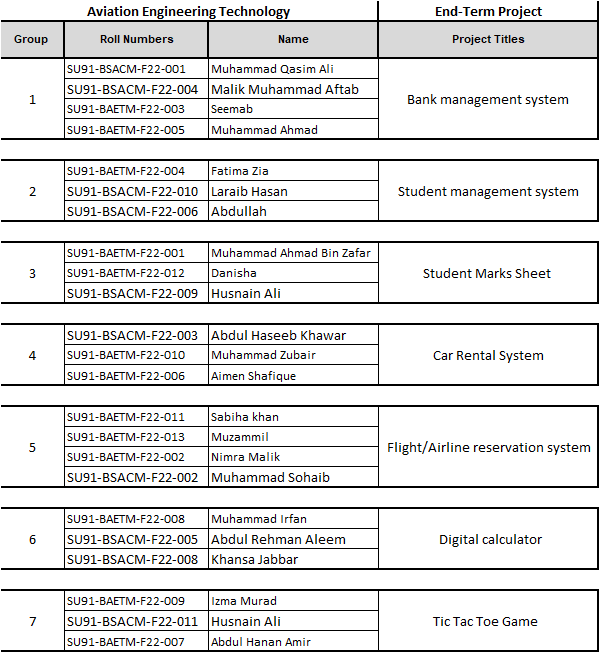
33 | Semester Project |

0 Comments